

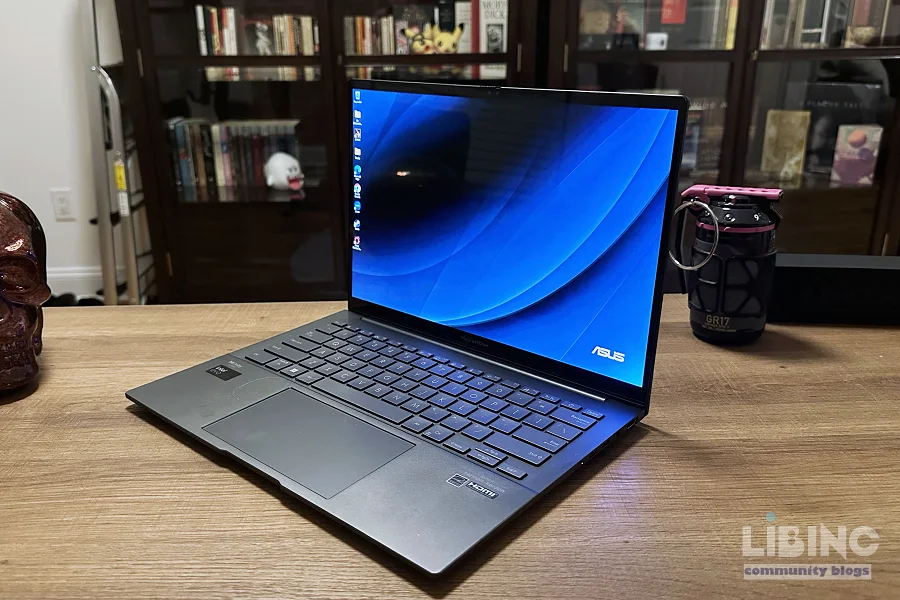
Beyond Portability: Engineering the Optimal Ultrabook for 2026 Remote Work
The modern remote office resides within the constraints of a thirteen-inch chassis. As professional workflows increasingly rely on hybrid computing—juggling heavy local execution against cloud-based virtual environments—the traditional ultrabook faces an existential crisis. The marketing narrative promises "all-day battery" alongside "desktop-class performance," yet the laws of thermodynamics remain unyielding. When your workstation is also your primary communication hub, the delta between peak performance and thermal throttling is where productivity either thrives or collapses. We are no longer selecting a device for occasional email and browsing; we are engineering a mobile infrastructure. This analysis deconstructs the hardware realities of 2026, stripping away manufacturer benchmarks to reveal how thermal density and power scheduling dictate the true viability of high-end mobile workstations.
The Physics of Compromise: Power, Heat, and Form Factor
The ultrabook design mandate is fundamentally a battle against entropy. Every watt drawn by a System-on-Chip (SoC) must be dissipated as heat, and in a chassis thinner than fifteen millimeters, the surface area for thermal exchange is insufficient to sustain peak loads indefinitely. Manufacturers often advertise peak clock speeds that a device can maintain for exactly ninety seconds before thermal thresholds trigger aggressive down-clocking. This is the "burst performance" trap. For a remote professional, this means that heavy data processing or complex video conferencing can cause the system to feel responsive for a moment, only to stutter precisely when the workload intensifies.
The conflict here lies in the consumer expectation of thinness versus the engineering reality of sustained thermal dissipation. To maintain high performance without throttling, a device requires a massive heat sink or an active cooling solution that can move a significant volume of air. Ultrabooks that omit fans in favor of absolute silence are trading computational sustainability for aesthetic form. When the internal temperature rises, the system decreases voltage and frequency, which is the silicon equivalent of slowing down mid-sentence to catch one's breath. Relying on such hardware for demanding professional tasks introduces a variable latency that can disrupt virtual meetings and delay data-intensive operations.
Furthermore, the integration of high-resolution displays often overlooked in performance metrics acts as a major battery drain. An ultrabook driving a four-hundred-nit panel at high frequency is exhausting its energy reserves significantly faster than a machine with a lower power draw, regardless of how efficient the processor is. The intelligent buyer must recognize that the chassis is not merely a container; it is an active component of the cooling system. If the internal volume is too low, the device will always prioritize thermal safety over output, effectively clipping the wings of the high-end components housed within.
Quantifying Throughput: Real-World Latency in Remote Environments
Synthetic benchmarks serve as the primary currency for retail marketing, yet they bear little resemblance to the chaotic environment of a modern remote workday. A benchmark run in a temperature-controlled lab, with no background processes and an optimized power profile, represents a best-case scenario that is rarely replicated in the real world. Remote work involves a complex stack: VPN tunnels, encrypted communication clients, virtualized development environments, and multiple browser instances with dozens of tabs. These applications demand consistent background CPU cycles and memory access.
The real-world throughput of an ultrabook is defined by how it manages these competing processes. When a system attempts to balance a resource-heavy virtual desktop interface with a high-fidelity video call, the overhead of context switching becomes the primary bottleneck. If the processor lacks sufficient unified memory bandwidth or efficient thread scheduling, the user experiences micro-stutters—the kind that makes a cursor drag or an audio stream desynchronize. In 2026, the shift toward AI-assisted workflows adds a new layer of complexity; background neural processing tasks can steal cycles from foreground applications if the SoC is not architected for high-concurrency efficiency.
Comparison reveals a stark reality: two laptops with identical processors often exhibit wildly different real-world performance based solely on their firmware power-management policies. One manufacturer might prioritize a snappy, aggressive response that drains the battery in three hours, while another optimizes for a conservative, steady-state output that lasts the entire shift. Professionals must look past the "Core i" or "Ryzen" branding and investigate the device’s "Power Limit" settings—specifically the PL1 and PL2 values. PL2 represents the short-term burst, while PL1 is the long-term sustained power level. A device with a high PL2 but a very low PL1 is a recipe for frustration in a professional environment, as the machine will consistently slow down during long-duration tasks.
The Hidden Degradation: Why Thinness Undermines Longevity
The pursuit of the ultra-thin form factor has a measurable impact on the lifespan of the hardware, specifically the lithium-polymer battery modules. Heat is the primary antagonist of battery chemistry. By packing dense, heat-generating components against a battery cell in a tight chassis, manufacturers accelerate the chemical degradation of the battery’s capacity. This is an invisible cost to the user: the laptop might be fast and slim today, but in eighteen months, its battery health may drop to eighty percent of its original capacity, drastically reducing the mobility that was the original justification for the purchase.
The reconstruction of an ultrabook’s internal architecture often reveals that the battery is placed in the most thermally sensitive areas of the machine to maintain a center-of-gravity balance. When the user pushes the device during a sustained remote-work session, the battery absorbs the residual heat from the motherboard and storage modules. Over hundreds of charge-discharge cycles, this cyclical thermal stress causes the internal resistance of the battery cells to rise. This, in turn, reduces the efficiency of energy delivery, leading to unpredictable shutdowns or a precipitous drop in battery percentage when the processor hits a high load.
This dynamic creates a forced upgrade cycle. While the hardware might still be computationally relevant, the physical battery capacity becomes so diminished that the device ceases to function as a mobile workstation. To counter this, savvy professionals prioritize devices that offer high-grade cooling systems and, crucially, firmware-level battery charge limiting. Limiting the charge to eighty percent is a well-documented method for extending chemical longevity, yet many consumer-grade ultrabooks lack the granular software control to enforce this at the BIOS level. Choosing a machine with robust power management tools is not just about battery life today; it is about ensuring that the device remains usable three years from now.
Silicon Evolution: Architectural Shifts Shaping Mobile Productivity
The landscape of 2026 silicon is dominated by the integration of discrete Neural Processing Units (NPUs) directly into the SoC, a shift that fundamentally alters how we manage energy-intensive tasks. In previous cycles, running real-time background noise cancellation, video enhancement, or local language model inference would have required significant CPU overhead, resulting in thermal spikes and battery drain. Modern mobile architectures now delegate these "always-on" tasks to the NPU, which is designed to perform these specific operations with a fraction of the energy consumption of a general-purpose processor core.
This architectural shift allows for a more fluid performance experience. By offloading system-level maintenance tasks to specialized silicon, the primary CPU cores are left free to handle the active, user-facing workload. However, this creates a new dependency: the software stack must be optimized to take advantage of this heterogeneity. If an application is not coded to offload its inferencing to the NPU, it falls back to the CPU/GPU, effectively negating the power-efficiency gains that the new hardware is designed to provide. This is a critical insight for the remote worker; the effectiveness of your hardware is now as much a product of its architectural synergy as it is a product of its raw clock speed.
Looking at the causal chain of productivity, the integration of high-bandwidth memory (HBM) or ultra-fast LPDDR5x RAM directly onto the silicon package further reduces the latency associated with data movement. Moving data between a discrete memory module and the processor consumes far more energy than accessing on-package memory. In the mobile context, this translates to longer battery life and reduced heat. As we move through 2026, the devices that perform best are not necessarily those with the highest peak gigahertz, but those with the most refined memory-to-processor interconnects. The bottleneck has migrated from raw compute to data throughput, and the ultrabooks that address this are the ones that survive the rigors of an intensive professional remote-work day.
Strategy for Acquisition: Beyond Manufacturer Specifications
The process of selecting an ultrabook must evolve from checking specification sheets to mapping specific workload requirements against thermal and power capabilities. The industry-standard approach of comparing core counts or SSD sizes is largely obsolete, as these metrics rarely correlate with the sustained, real-world productivity that remote work demands. Instead, one must adopt an engineering mindset, treating the laptop as a balanced system where no single component should be so powerful that it overwhelms the cooling or battery capacity.
The first step in this strategy is to assess the "thermal headroom" of the intended device. This can often be determined by looking at the thickness of the chassis in relation to the wattage of the processor. A device with a thin frame but a high-wattage chip will almost certainly suffer from thermal throttling under sustained load. Professionals should actively seek out reviews that conduct long-duration "stress tests" rather than brief, burst-focused benchmarks. If a laptop can maintain its performance for a full thirty-minute simulation of a real-world workload, it is likely capable of supporting a remote professional.
Next, prioritize connectivity and peripheral ergonomics, which are often the forgotten variables of the remote work experience. An ultrabook with limited physical ports forces the user into a reliance on external hubs and dongles, which introduce latency, reliability concerns, and additional power draw. The ideal machine in 2026 is one that integrates high-speed, low-latency interfaces like USB4 or Thunderbolt 5 natively, providing a clean path for displays and data without adding to the system’s thermal management burden. Finally, consider the repairability and support ecosystem. A professional-grade machine is one that can be easily serviced—where a battery can be replaced without specialized equipment, and where internal dust buildup can be cleaned from the cooling fan assembly. This is the ultimate hedge against planned obsolescence, ensuring that the tool remains a productive asset long after its initial purchase.
The Architecture of Workflow Resilience and Data Integrity
The modern remote worker is essentially a node in a decentralized corporate infrastructure. The performance of an ultrabook is no longer measured by its ability to render a local file, but by its capacity to maintain data integrity and session persistence across unstable network environments. When an ultrabook encounters a network drop or a packet-intensive synchronization process, the system-level overhead increases exponentially. We often disregard the "Hidden Power Cost" of background synchronization—those invisible threads that maintain constant contact with cloud servers for real-time collaboration. In a high-performance scenario, the CPU must prioritize these intermittent spikes in network activity while simultaneously managing foreground rendering. If the system's power-management scheduler is too rigid, these competing priorities lead to an I/O bottleneck.
True resilience in this context is found in hardware that features intelligent, granular task offloading. We are seeing a shift where the most successful professional ultrabooks of 2026 are those that utilize dedicated hardware controllers for background connectivity, keeping the primary SoC in a low-power state even while data is being transmitted. This is the difference between a machine that stays cool and responsive and one that suddenly spins up its fans and experiences micro-lags when the office suite decides to sync a local cache to the cloud. The professional must analyze the "I/O throughput stability" of a potential machine. If the storage controller and network interface are forced to fight for the same PCIe lanes as the primary graphics subsystem, performance will oscillate.
This stability is vital for users working in virtualized environments. Accessing a remote desktop via a client is deceptively demanding; it requires constant, low-latency decoding of high-resolution video streams. If the ultrabook’s cooling solution cannot handle the sustained, albeit low-power, load of constant video decoding, the buffer begins to swell, leading to input lag. An expert-level assessment of this behavior reveals that the "feel" of a computer—that elusive sense of responsiveness—is directly tied to the consistency of the frame delivery during these background tasks. We must discard the idea that "higher clock speed" is the solution to these issues. Instead, we must look for architectural coherence, where the power budget is dynamically distributed by a firmware layer that understands the difference between a background sync process and a critical user input. This level of granular control is the hallmark of professional-grade hardware. It is what separates a tool designed for long-term productivity from a device that merely serves as an expensive consumer appliance. When investing in a workstation for remote work, the primary metric should be the efficiency of this internal resource orchestration.
The Psychology of Mobile Performance and the Future of Human-Computer Interaction
The interface between the professional and their machine is shifting from a tool-user relationship to a collaborative partnership, where the limitations of the hardware directly impact the cognitive load of the user. Research into human-computer interaction (HCI) consistently demonstrates that latency exceeding fifty milliseconds in user interface feedback triggers a measurable decline in cognitive task performance. When an ultrabook slows down due to thermal throttling or inefficient resource scheduling, it doesn't just frustrate the user; it actively degrades their ability to perform complex analytical tasks. The mental effort required to adjust to a lagging system—the "cognitive friction"—is a significant, yet rarely acknowledged, tax on the professional’s daily productivity.
By 2026, the integration of AI-driven predictive performance management aims to mitigate this friction. These systems "learn" the user’s work rhythm, pre-loading critical applications and scaling the power profile before a task begins. However, this creates a new vulnerability: the "black box" effect. When the system makes autonomous decisions about how to allocate power, it can occasionally interfere with professional tasks that have non-obvious performance requirements. An example is the "bursty" nature of professional creative software, which might look like idling to an AI-managed power scheduler, causing the system to down-clock at the worst possible moment. The professional must maintain agency over these automated systems.
The future of hardware selection lies in the transparency of these management layers. A machine that provides the user with an "observability dashboard"—a way to see exactly where the power is going and why the system is slowing down—is infinitely more valuable than one that hides this information behind a opaque "Performance Mode" toggle. We are entering an era where the professional must become a "system operator," understanding the interplay between their software environment and their hardware’s limitations. This does not mean everyone needs to be a computer engineer; rather, it means that the bar for professional hardware has risen. A device is no longer just a chassis, a CPU, and a battery. It is a complex, dynamic environment that must be tuned to the specific needs of the work. The psychological comfort of knowing that the hardware will behave predictably under load is a massive, and often ignored, factor in maintaining high levels of professional output. As we look forward, the premium market will be defined by this level of predictability, separating the high-performance professional workstations from the increasingly chaotic world of consumer-grade mobile computing.






Add a comment
To comment, you need to register and authorize
Comments
We are drifting toward a "Managed Performance" paradigm. Manufacturers are increasingly locking down firmware to prevent users from optimizing their machines, citing "safety" and "efficiency." However, this creates a situation where the hardware manufacturer decides, through proprietary algorithms, what constitutes a "productive" workload. This is a subtle but profound encroachment on the professional’s autonomy. If a laptop's AI-scheduler assumes that a long-running local compilation or a multi-layered data analysis is an "anomaly" and suppresses performance to save power, the user is being penalized for their actual work requirements. We are seeing the rise of "Opinionated Hardware"—devices that are engineered for a specific, narrow type of usage. If your workflow deviates from the manufacturer’s vision, you are not just inefficient; you are structurally incompatible with your own computer.
This leads to a phenomenon I call "Performance Gaslighting." The machine reports that it is functioning perfectly—the battery is charged, the CPU is running, the fans are silent—yet the user feels a persistent, nagging friction. The machine is "optimized," but it is optimized for the lab, not for the messy, unpredictable reality of human professional output. The consumer is being subtly coerced into conforming their workflow to the device’s limitations. When we select a machine, we are not just buying a set of components; we are signing a contract with a software-defined power management policy that may fundamentally conflict with our professional output needs.
Furthermore, consider the implications for the future of "Repairability as Resilience." We focus on hardware repair, but in 2026, software-repairability is equally important. If I cannot audit, modify, or override the power management firmware of my primary workstation, do I truly own it? A machine that forces a specific, unchangeable power profile is effectively a "Service-as-a-Hardware" model. We are seeing a blurring of the line between owning a tool and leasing a service, where the manufacturer retains ultimate control over the hardware’s behavior long after the transaction. This is the "hidden debt" of modern professional computing.
To truly master our environment, we must demand "Transparency of Intent" from hardware manufacturers. We need to move beyond the marketing fluff of "adaptive performance" and force a return to user-controllable hardware states. A professional should have the right to prioritize performance over battery life, or silence over raw power, based on their immediate, non-negotiable professional requirements. We should not be forced to accept a "balanced" profile that makes nobody happy. The ultimate ultrabook of 2026 is not the one with the best marketing specs; it is the one that respects the user's intent above its own internal automation. It is the machine that acknowledges its role as a subordinate to the user’s professional goals, rather than an arbitrary arbiter of them. This is the frontier of professional hardware—not just faster silicon, but the restoration of the professional’s sovereignty over their digital workstation. We must treat our hardware not as a collection of features, but as a commitment to the integrity of our own creative and analytical agency. If we fail to reclaim this control, we are merely consumers of our own work, constrained by the walls of the devices we once thought we owned.